
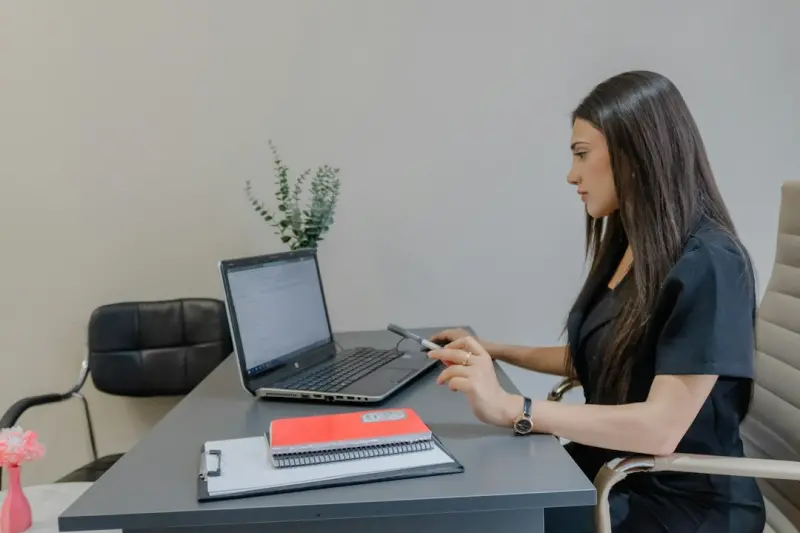
When the pandemic turned our living rooms into offices, my daily commute swapped a subway car for a swivel chair. The transition felt seamless—until my lower back started sending SOS signals during a three‑hour Zoom call. That’s when I realized the traditional physiotherapy model—appointments, travel, waiting rooms—was at odds with the new reality of remote work. I set out to design a system that lets anyone, anywhere, turn their home office into a therapeutic studio, without sacrificing productivity or sanity.
Why Remote Workers Need a New Physiotherapy Playbook
Remote work isn’t just a change in location; it’s a shift in posture, movement patterns, and even mental focus. The ergonomics of a home desk are often makeshift: a laptop on a kitchen table, a dining chair that’s not meant for long‑term support, and a lack of clear boundaries between “work” and “rest.” These conditions create a perfect storm for:
- Upper‑crossed syndrome (rounded shoulders and a forward‑head posture)
- Hip flexor tightness from prolonged sitting
- Reduced lumbar disc hydration
- Increased mental fatigue that blurs the line between discomfort and pain
Traditional physiotherapy can address these issues, but the logistics—scheduling, commuting, and the occasional “I’ll just pop in next week” mindset—often lead to sporadic care. What we need is a self‑directed, evidence‑based framework that fits into the ebb and flow of a remote professional’s day.
The Core Pillars of a Self‑Guided Routine
After months of trial, error, and conversations with fellow physiotherapists, I’ve distilled the approach into four pillars: Awareness, Activation, Alignment, and Adaptation.
1. Awareness: Listening to Your Body’s Subtle Signals
Before you can fix anything, you must first sense it. I start each morning with a body scan—a five‑minute mindfulness exercise where I mentally check tension levels in the neck, shoulders, thoracic spine, lumbar region, hips, and knees. This isn’t about yoga; it’s about building a neuro‑muscular feedback loop that alerts you the moment you start slouching or tightening.
Pro tip: Set a recurring timer on your phone every 45 minutes. When it buzzes, pause, take three deep breaths, and assess the position of your spine. Over time, you’ll notice patterns—perhaps your shoulders collapse after a particular task or your lower back aches after a certain stretch of coding. These data points become the blueprint for targeted interventions.
2. Activation: Engaging the Muscles That Keep You Upright
Most remote workers think “I’m not exercising, so I don’t need to move.” Wrong. The muscles that support posture—deep cervical flexors, thoracic retractors, multifidus, gluteus medius—are often dormant when we sit for hours. Simple, low‑load activation drills can revive them without stealing time from work.
- Chin Nods (Cervical Activation): Sit tall, gently tuck your chin, and perform 10 slow nods. This re‑engages the longus colli and helps counteract forward head posture.
- Scapular Retractions: With elbows at 90°, squeeze shoulder blades together, hold for three seconds, repeat 12 times. This targets the rhomboids and middle trapezius.
- Hip Marches: While seated, lift one knee toward the ceiling, lower, and switch sides. Do 15 reps each side to wake the hip flexors and glutes.
These moves take less than two minutes and can be slotted into any break. Consistency is key; the goal is to make micro‑activation a habit rather than a chore.
3. Alignment: Re‑Educating Your Body’s Postural Map
Activation alone isn’t enough if you return to a poorly set workstation. I recommend a quick ergonomic audit using everyday items:
- Screen Height: Your monitor’s top should be at eye level. If your laptop sits on a stack of books, you’re already in a flexed neck position.
- Keyboard & Mouse Placement: Keep elbows close to a 90‑degree angle; wrists should stay neutral, not bent up or down.
- Seating: Use a chair that supports the lumbar curve or add a small lumbar roll. If a dining chair is your only option, place a rolled towel behind the lower back.
Once you’ve optimized the setup, incorporate small movement strategies throughout the day. The idea is to treat your workspace as a dynamic environment—standing to answer a call, a brief desk‑side squat before a meeting, or a quick hip hinge while waiting for a file to download. These micro‑movements add up, preventing stiffness and maintaining joint fluidity.
4. Adaptation: Scaling the Routine as Demands Change
Remote work isn’t static; deadlines, projects, and personal life ebb and flow. Your physiotherapy plan must be flexible. I use a simple three‑tier system:
- Base Tier (Daily): Awareness checks, activation drills, ergonomic maintenance.
- Progression Tier (3‑5 times per week): Structured mobility circuits—spine rotations, hip openers, shoulder mobility flow—lasting 10‑15 minutes.
- Challenge Tier (1‑2 times per week): Strength‑focused sessions using resistance bands or bodyweight (e.g., glute bridges, wall slides, bird‑dogs).
When workload spikes, you can drop to Base Tier without feeling like you’re “missing” therapy. When you have bandwidth, you can add the higher tiers. The key is to recognize the signals—fatigue, soreness, decreased focus—and adjust accordingly.
Tools of the Trade: Low‑Cost, High‑Impact Aids
You don’t need a pricey gym or a stack of equipment to succeed. Here are a few items that have become staples in my remote physiotherapy kit:
- Resistance Band: Versatile for rows, shoulder external rotations, and glute activation.
- Foam Roller (or a tennis ball): Ideal for myofascial release on the thoracic spine, calves, and IT band.
- Lumbar Roll: A small pillow or rolled towel to maintain lumbar curvature during seated work.
- Standing Desk Converter: If you can’t afford a full‑size standing desk, a converter allows you to alternate between sitting and standing.
Investing in these tools costs less than a monthly coffee habit, yet the ROI—reduced pain, higher productivity, better posture—pays dividends in both health and career performance.
The Bigger Picture: How Environment Influences Musculoskeletal Health
While we focus on the chair and screen, there’s an often‑overlooked factor: the broader environment. Research increasingly shows that climate variables—temperature fluctuations, humidity, even air quality—affect joint inflammation and pain perception. In a recent deep dive, I explored how environmental stress and joint health intersect, especially for individuals with predispositions to inflammatory conditions.
For remote workers, this means paying attention to indoor climate control. Keep your workspace at a comfortable temperature (around 21‑23°C) and consider a humidifier if the air feels dry. Poor air quality can exacerbate systemic inflammation, subtly undermining your physiotherapy gains.
Tracking Progress Without a Clinic
One of the biggest fears about self‑guided physiotherapy is “How do I know I’m improving?” The answer lies in simple, quantifiable metrics:
- Range of Motion (ROM) Tests: Use a smartphone inclinometer app to measure shoulder flexion, lumbar flexion, and hip extension. Record baseline values and re‑test every two weeks.
- Pain Diary: Log pain intensity (0‑10 scale), location, and triggers. Over time, you’ll see trends—perhaps a reduction in mid‑day lumbar discomfort after adjusting your chair height.
- Functional Benchmarks: Track how many wall squats you can perform with proper form, or how long you can hold a plank without lower back sagging. These benchmarks provide tangible evidence of progress.
When numbers move in the right direction, you’ll feel motivated; when they stall, you can tweak the routine—add a new activation drill, adjust your ergonomic setup, or increase the intensity of your strength session.
When to Call in a Professional
Self‑guidance is powerful, but it isn’t a blanket substitute for professional assessment. Seek a physiotherapist if you encounter any of the following:
- Sharp, localized pain that doesn’t improve with movement
- Persistent numbness or tingling in the limbs
- Loss of strength (e.g., difficulty lifting a coffee mug)
- Any red‑flag symptoms such as fever, unexplained weight loss, or recent trauma
Even a single telehealth session can provide a personalized movement prescription, ensuring you’re on the right track.
My Personal Success Story (And a Call to Action)
After three months of implementing this framework, my lower back pain dropped from a daily 6/10 to an occasional 1/10, and my productivity metrics climbed—my code review turnaround time improved by 15%, and I felt less mentally drained after long meetings. The biggest surprise? My mood lifted. When the body feels supported, the mind follows suit.
If you’re reading this from a home office, I challenge you to try the 30‑Day Desk‑to‑Dynamic Challenge:
- Day 1: Perform the three awareness checks and activation drills.
- Day 7: Complete your first mobility circuit.
- Day 14: Add a 10‑minute strength session.
- Day 30: Review your ROM, pain diary, and functional benchmarks. Celebrate any improvement, no matter how small.
Share your journey in the comments or tag me on LinkedIn using #DeskToDynamic. Let’s build a community of remote professionals who refuse to let a chair dictate their health.
Remember, physiotherapy isn’t a destination; it’s a continuous conversation between you, your body, and the space you occupy. Make that conversation intentional, and watch how your work—and life—transform.

William Roy is a freelance writer originally from Montreal who moved to Ottawa with his wife of 50 years to be closer to their grandkids. Alongside his writing, William has a passion for fishing.
Related Posts

Micro‑Movements at the Desk: A Physiotherapist’s Guide
Kelly Reynolds shares a practical, evidence‑based approach to integrating micro‑movements into d... Read More

Your Desk as a Physiotherapy Hub: Turning Everyday Work into Movement‑Based Healing
Learn to convert your office chair into a low‑intensity physiotherapy station using movement micro... Read More
Beyond the Clinic: How Wearable Tech Is Revolutionizing Physiotherapy Prehab
Discover the power of wearable technology in physiotherapy prehab, from real‑time feedback to AIâ€... Read More
Top Posts

Micro‑Rituals for Expecting Mothers: Small Steps, Big Impact
Learn the power of tiny, intentional habits during pregnancy—how a few minutes of mindful breath, gentle movement, and sensory focus can transform your journe...Read More

Data‑Driven Compassion: Redefining Eating Disorder Care
A fresh look at eating disorder care blends analytics with empathy, offering early detection, transparent metrics, and actionable steps for organizations and cl...Read More

When Your Liver Sends an SOS: Spotting Early Warning Signs in a Fast‑Paced World
Discover the hidden cues your liver gives when under stress, and implement practical micro‑habits, nutrition tips, and remote coaching strategies to protect l...Read More

Beyond the Snore: Turning Sleep Apnea Into a Catalyst for Health and Connection
Sleep apnea isn’t just a nighttime nuisance—it affects brain waste clearance, relationships, and overall health. Learn holistic tactics to improve breathing...Read More
0 Comments
Post Comment
You will need to Login or Register to comment on this post!